A fresh lap for a classic

Chocolate
Stunts.

The driving game you remember.
More ways to make the next lap your best.

See the difference

Same game. A clearer view.

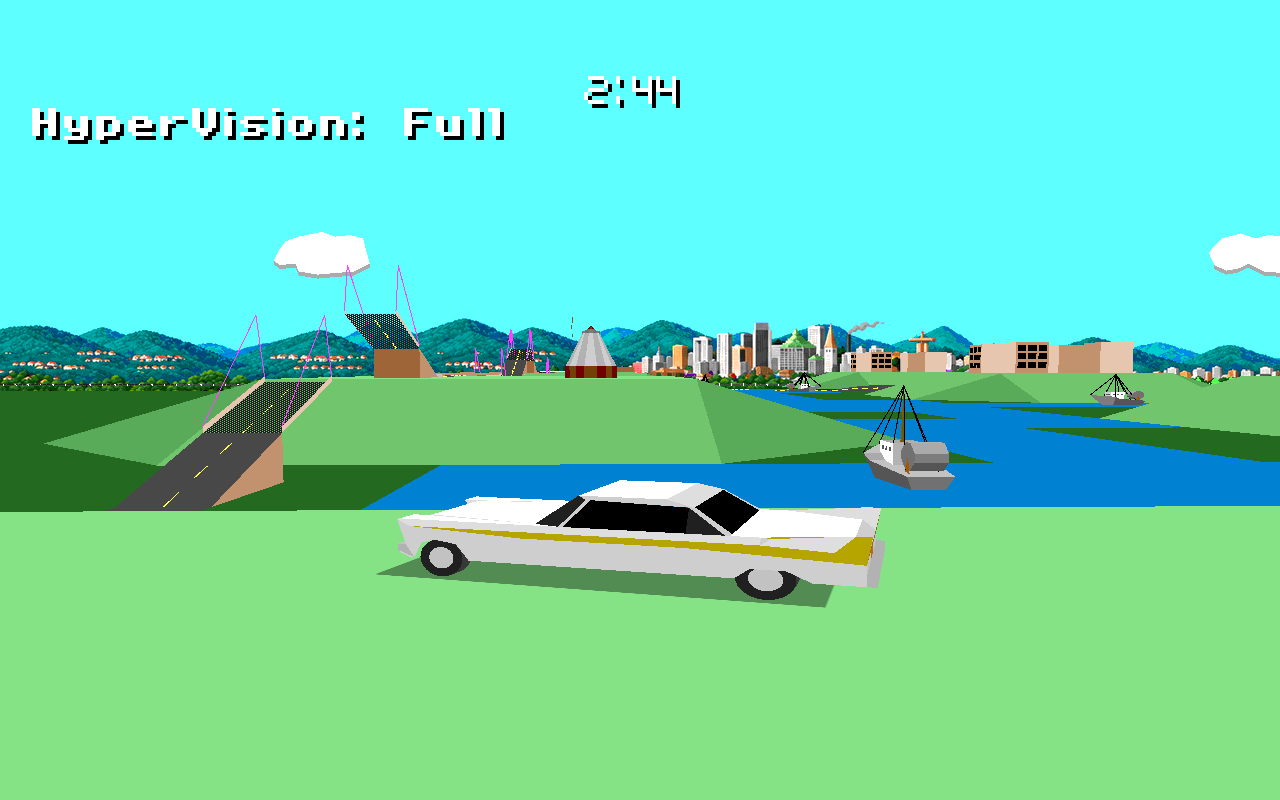
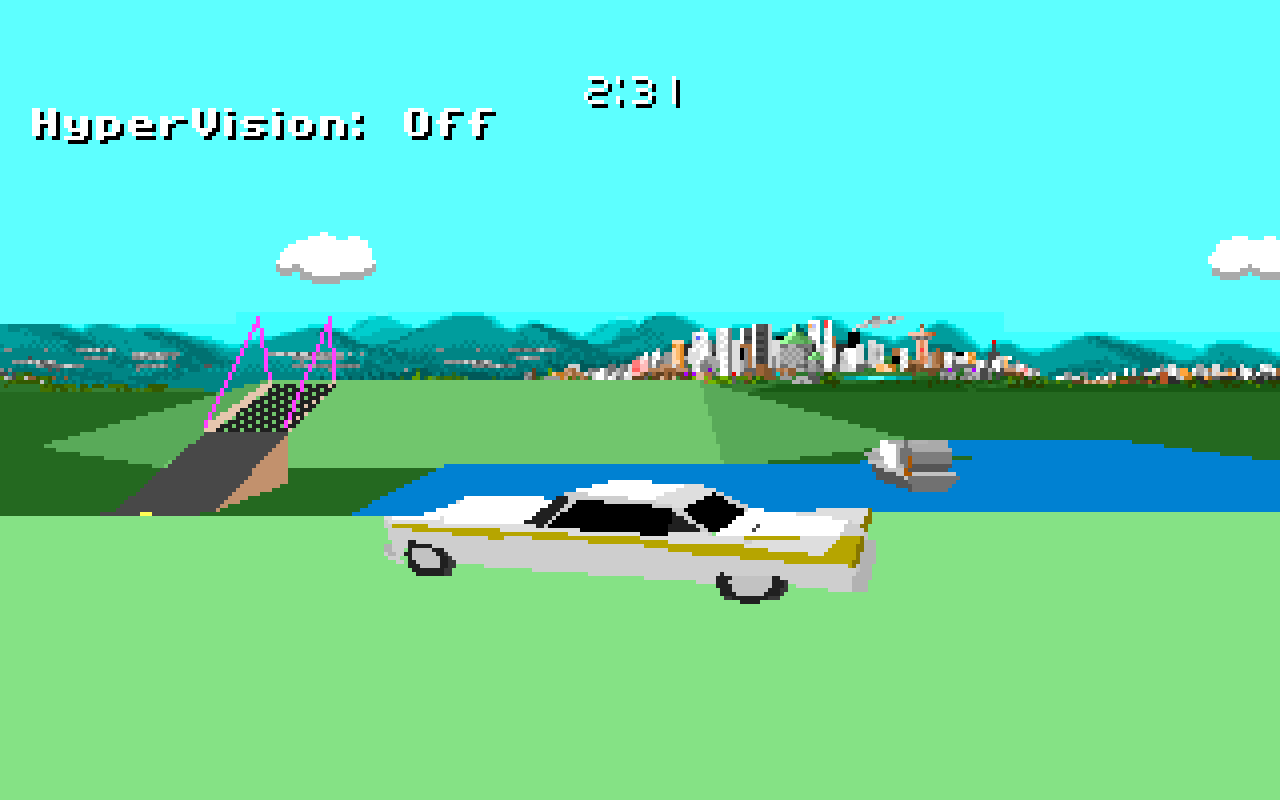
Compare the original graphics with HyperVision at full quality.

Enhanced Stunts graphics: a white car beside the water, with distant bridges, hills, and a city skyline.

Before: 320 × 200, enlarged with nearest-neighbor scaling. After: 1280 × 800 with HyperVision.

Latest release

What’s new

v1.3.0

RELEASED

The additions since v1.2.0:

  • Tesla Roadster Rocket and McMurtry Speirling PURE, both with active downforce that holds them upside down even while stationary.
  • A desktop startup window and startup choices including Dual-Way Switching and Amiga Grass.
  • Linux AppImages for Ubuntu 10, Fedora 12, Debian 6 or newer on x86, with ARM packages also available.
  • Android APKs for Android 5 or newer, in 64-bit and 32-bit ARM versions.
  • New Haiku, Amiga500+, and TempleOS ports.
  • Controllers on desktop, web, and Android.
  • Android TV support with controllers, keyboards, and compatible remote controls.
  • A touch-control overlay on Android and web, including browser play on phones.
  • Repldump options to automatically validate OWOOT and calculate driving and penalty times.

Familiar at heart

A few more reasons to race.

For a more detailed list, check out the new controls and settings in the hotkeys & parameters quick guide.

01

Take that corner again.

Rewind while you drive

  • Hold Q to go back in time. Release it and carry on from that moment.
  • Try a new line without leaving the race or opening the replay controls.

Rewound runs are marked as modified and do not qualify for the normal high-score table (but you can use the trick to make it so).

02

Little things. Better laps.

Quality of life

  • A bigger garage: up to 120 cars, instead of 32.
  • Custom speedometer and tachometer needle colours for custom cars.
  • See the replay filename during playback.
  • F3 cycles three new chase cameras and the original adjustable view.
  • F11 or Shift+F11 toggles FPS and render time on or off in modern ports. DOS16 shows only FPS. Use Shift+F11 in browsers where F11 toggles fullscreen.
  • Ctrl + F12 saves a PNG screenshot to your game folder in SDL3 builds. Browsers download it when folder saving is unavailable. Screenshot details.
  • --nointro takes you straight to the main menu.
  • Build and version information in the Options menu.
  • Alt + Enter toggles fullscreen in desktop ports.
03

A rival worth chasing.

Race against a ghost

  • Choose Opponent → Clock → Ghost, then select a replay to race against.
  • Drive its track in your choice of car. The ghost follows the recorded run and never collides with you.
  • Rewind or restart: your ghost stays in sync. Press T to see the race from its view.
04

Stay on track.

OWOOT · One Wheel On Or Over Track

  • Enable --owoot: at least part of one tyre must stay on or above the road. Going underneath it does not count; large-corner rumble strips count as grass.
  • Follow loops, corkscrews, slaloms, and other stunts along their intended route.
  • Jump the single off-road tile between connected, aligned ramps or bridges. Arbitrary flights over grass are out.
  • Break a rule and the run ends in a crash. OWOOT is optional and off by default.
  • Validate replays and calculate penalty time: repldump RACE.RPL --owoot --time writes an OWOOT pass/fail result and a report of driving and penalty times. A pass requires a completed race without violations or crashes. Replay-checking options.
05

Old quirks. Your call.

Optional legacy bug fixes

OFF BY DEFAULT

Keep the original handling, or opt into these fixes individually.

  • --pg:off disables power gear and anti-power gear, restoring the missing aerodynamic slowdown.
  • --lcb:off removes the original left-corner steering advantage.
  • --dws:off fixes penalties for shortcuts between split-track branches; Dual-Way Switching stays on by default.
  • --lc:off fixes legacy collision behaviour:
    • No slipping through concrete blocks or loop bases.
    • Fixes low-speed wall crossings in corkscrew up/down pieces.
    • No false crashes beneath an open ramp where a hill meets it.
    • No permanent steering bias left behind after a collision.

Replay compatibility comes first. Replays do not store these switches or the OWOOT setting. Use the same settings for recording, playback, and ghost racing.

06

See the whole track.

The HyperVision renderer

  • F12 turns HyperVision Auto on or off. Shift + F12 cycles fixed Full → High → Medium → Low quality.
  • Full view distance: see the entire 30 × 30 track at Full quality.
  • Up to 1280 × 800 rendering with smooth, interpolated motion targeting 60 FPS and VSync on desktop ports.
  • Auto adapts resolution, detail, and view distance to keep the action smooth. Fixed presets keep you in control.
  • Water stays blue, including beneath multi-tile track pieces.
  • Car shadows, sharper horizons and opponent portraits, and corrected visual car height.

Explore the interactive input & video delay timeline to compare HyperVision with the original 20 FPS renderer.

HyperVision preserves the original physics and runs in modern ports, including browser and DOS32; DOS16 retains SuperSight with a simpler extended view, without high resolution, interpolation, or the quality presets.

07

Turn the world upside down.

Two new cars

  • The Tesla Roadster Rocket and McMurtry Speirling PURE join the garage, bundled with every release package.
  • Both cars have active downforce: they can stay attached upside down even at zero speed without falling.
  • Select either car in the usual car-selection screen. Active downforce works automatically.
08

Set up your next lap.

The startup window

  • Choose your game folder, graphics, music, fullscreen mode, and driving rules before starting. Desktop builds now include a native startup window, alongside the web and Android startup screens.
  • Power Gear preserves the original power gear and anti-power gear behaviour; turn it off to restore the missing aerodynamic slowdown.
  • Original Collision Bugs preserves the original collision behaviour; turn it off to enable the collision fixes.
  • Left Corner Bias preserves the original left-turn steering advantage; turn it off for symmetrical steering.
  • Dual-Way Switching keeps the original split-track penalty behaviour when enabled; turn it off to apply the fix.
  • Chicane Fast-Grass keeps chicane green areas as fast as road. Turn it off, or use --cfg:off, to give them ordinary grass behaviour.
  • Amiga Grass gives the stock cars the original Amiga grass grip. Use --amigagrass when launching from the command line.
  • OWOOT (One Wheel On Or Over Track) requires part of at least one tyre to stay on or above the road and the car to follow each stunt’s intended route. It is off by default.

The launch-parameter guide covers these settings and the other command-line options.

09

Play your way.

Controllers, touch, and TV

  • Controller support on desktop, web, and Android: drive, navigate menus, change cameras, and rewind from your gamepad.
  • An optional control overlay on Android and web puts driving and menu controls on the touch screen, so you can play the web version on your phone.
  • Android TV supports controllers, keyboards, and compatible TV remotes for racing, menu navigation, and shortcuts.

See the controller layout and the Android TV remote layout.

Pick your platform

Find your next starting grid.

From classic DOS and Amiga to desktop, Android, and TV. Bring your own Brøderbund Stunts 1.1 game files.

Chocolate Stunts v1.3.0 is available. Choose your package below, read what’s new, or view the release notes and checksums.

Choose an operating system, then expand its architecture to see the packages. Linux x86 AppImages support Ubuntu 10, Fedora 12, Debian 6 or newer; ARM requirements are listed separately. Android APKs support Android 5 or newer.

32 / 64 / 16 = package bitness · = no SSE2 requirement

Windows
Linux
MacOS
Android
DOS
BSD
Haiku
TempleOS
Amiga500+

ARM ports do not use SSE2. MacOS Universal includes both Intel and Apple Silicon. Choose the architecture of your operating system; some Android TV devices need a 32-bit APK even with a 64-bit processor. The TempleOS guide covers installation and screenshots.

One more lap?

Play right here.

Choose your own game folder, then start your engine. Your game files and saves stay on your device and are never uploaded.

Browser editionOpen in a new tab

The track is waiting.

Bring a folder containing your Brøderbund Stunts 1.1 game files. Play with a keyboard, controller, or the touch-control overlay on your phone.

Loads on request, so browsing the page stays lightweight.

Download the v1.3.0 offline browser package. See the browser guide for setup and saves.

Click or tap inside the game to focus it. Enable the control overlay in the startup screen for touch play, or connect a controller. The player includes setup instructions, save controls, and a key reference. Use its Fullscreen button for a larger view. You can also save restunts.html for offline play.